
Using Bootstrap to Create Beautiful Material Design Web Apps in 2026 – Complete Step-by-Step Tutorial
1 week ago

Google’s Material Design has become one of the most recognizable and beloved design languages in the world. Its clean layouts, bold colors, subtle shadows, meaningful animations, and intuitive user flows are now standard in millions of mobile apps. In 2026, with web experiences expected to match the polish of native mobile apps, developers and designers are increasingly looking for ways to bring that same Material Design aesthetic to the web.
That’s exactly where MDBootstrap (Material Design for Bootstrap) shines. MDBootstrap is a powerful, open-source UI kit that combines the battle-tested responsiveness and grid system of Bootstrap 5/6 with the beautiful visual language of Material Design. It provides over 500 ready-to-use components, dozens of animations, deep JavaScript integration, and excellent support for modern frameworks like React, Vue, and Angular.
Whether you’re building a portfolio site, an admin dashboard, an e-commerce store, or a SaaS landing page, MDBootstrap lets you create stunning, responsive, Material Design-inspired web applications quickly and efficiently — without starting from scratch or learning an entirely new framework.
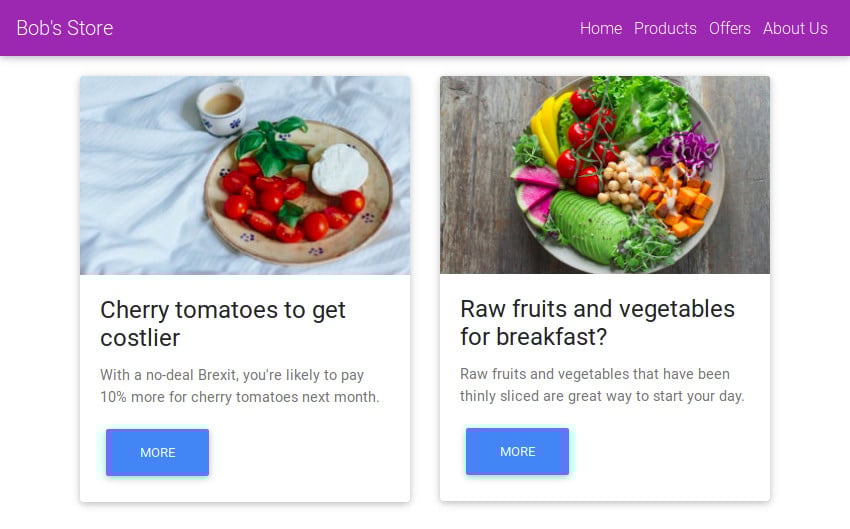
In this comprehensive 2026 updated tutorial, we’ll walk through everything you need to know to get started with MDBootstrap:
- Setting up the project with modern CDNs
- Creating a professional header with navigation
- Using the powerful Bootstrap grid system
- Building cards, forms, and interactive elements
- Adding animations and Material Design polish
- Best practices for performance and accessibility in 2026
By the end of this guide, you’ll be able to build fully responsive, visually appealing Material Design web apps that look and feel native — all while leveraging the familiar power of Bootstrap.
This tutorial is suitable for beginners with basic HTML/CSS knowledge as well as experienced developers who want to accelerate their workflow with a production-ready Material Design system.
Let’s dive in and start building beautiful web experiences!
Why Use MDBootstrap in 2026?
The Power of Combining Bootstrap + Material Design Bootstrap remains one of the most popular front-end frameworks thanks to its responsive grid, extensive component library, and excellent documentation. However, pure Bootstrap can sometimes feel generic or dated.
Material Design, on the other hand, brings modern aesthetics: depth, motion, consistent spacing, and delightful micro-interactions that users have come to expect from high-quality apps.
MDBootstrap merges the best of both worlds:
- Bootstrap’s rock-solid responsive foundation and grid system
- Material Design’s beautiful components, colors, shadows, and animations
- Extensive JavaScript enhancements for interactivity
- Support for popular frameworks (React, Vue, Angular)
Key Advantages in 2026
- Speed of Development — Hundreds of pre-built, accessible components
- Consistency — Material Design guidelines ensure professional polish
- Mobile-First — Fully responsive out of the box
- Customization — Easy theming with Sass variables and CSS custom properties
- Performance — Optimized minified files and tree-shakable components
- Accessibility — Built-in ARIA support and semantic markup
Who Should Use MDBootstrap?
- Freelance developers building client websites
- Startups creating MVPs quickly
- Agencies delivering consistent design systems
- Students and hobbyists learning modern web development
- Teams that want Material Design without building everything from scratch
Comparison with Alternatives
- Pure Bootstrap → Faster but less visually modern
- Tailwind CSS → More flexible but steeper learning curve
- Material-UI (React) → Excellent for React apps but heavier
- MDBootstrap → Best balance of beauty, speed, and framework familiarity
Setting Up Your MDBootstrap Project
Modern 2026 Setup Create a new HTML file and start with a clean HTML5 boilerplate:
<!DOCTYPE html>
<html lang="en">
<head>
    <meta charset="UTF-8">
    <meta name="viewport" content="width=device-width, initial-scale=1.0">
    <title>My Material Design App</title>

    <!-- Font Awesome -->
    <link rel="stylesheet" href="https://cdnjs.cloudflare.com/ajax/libs/font-awesome/6.5.0/css/all.min.css">

    <!-- Bootstrap CSS -->
    <link rel="stylesheet" href="https://cdnjs.cloudflare.com/ajax/libs/bootstrap/5.3.3/css/bootstrap.min.css">

    <!-- MDBootstrap CSS -->
    <link rel="stylesheet" href="https://cdnjs.cloudflare.com/ajax/libs/mdbootstrap/4.20.0/css/mdb.min.css">
</head>
<body>
    <!-- Content goes here -->

    <!-- Scripts at the bottom -->
    <script src="https://cdnjs.cloudflare.com/ajax/libs/jquery/3.7.1/jquery.min.js"></script>
    <script src="https://cdnjs.cloudflare.com/ajax/libs/bootstrap/5.3.3/js/bootstrap.bundle.min.js"></script>
    <script src="https://cdnjs.cloudflare.com/ajax/libs/mdbootstrap/4.20.0/js/mdb.min.js"></script>
</body>
</html>
Why This Order?
- Load styles first (Font Awesome → Bootstrap → MDBootstrap)
- Load scripts at the end for better performance
- MDBootstrap builds on top of Bootstrap, so the order matters
Creating Your First Header (Top App Bar)
<header>
    <nav class="navbar navbar-expand-lg navbar-dark purple">
        <div class="container">
            <a class="navbar-brand" href="#">MyApp</a>

            <button class="navbar-toggler" type="button" data-bs-toggle="collapse" data-bs-target="#navbarNav">
                <span class="navbar-toggler-icon"></span>
            </button>

            <div class="collapse navbar-collapse" id="navbarNav">
                <ul class="navbar-nav ms-auto">
                    <li class="nav-item"><a class="nav-link" href="#">Home</a></li>
                    <li class="nav-item"><a class="nav-link" href="#">Features</a></li>
                    <li class="nav-item"><a class="nav-link" href="#">Pricing</a></li>
                    <li class="nav-item"><a class="nav-link" href="#">Contact</a></li>
                </ul>
            </div>
        </div>
    </nav>
</header>
Use color classes like purple, blue, deep-orange, etc., to instantly apply Material Design palettes.
Mastering the Grid System and Cards
Bootstrap’s grid remains the foundation. MDBootstrap enhances it with beautiful card components.
Basic Grid Example
<div class="container mt-5">
    <div class="row">
        <div class="col-md-6">
            <!-- Card 1 -->
        </div>
        <div class="col-md-6">
            <!-- Card 2 -->
        </div>
    </div>
</div>
Beautiful Material Cards
<div class="card">
    <img src="image.jpg" class="card-img-top" alt="...">
    <div class="card-body">
        <h5 class="card-title">Card Title</h5>
        <p class="card-text">Some quick example text.</p>
        <a href="#" class="btn btn-primary">Button</a>
    </div>
</div>
Cards support hover effects, shadows, and ripple animations out of the box with MDBootstrap.
Building Forms with Material Design Style
Material Design forms are elegant with floating labels and smooth animations.
Example Newsletter Form
<div class="md-form">
    <input type="text" id="name" class="form-control">
    <label for="name">Your Name</label>
</div>

<div class="md-form">
    <input type="email" id="email" class="form-control">
    <label for="email">Email Address</label>
</div>

<button class="btn btn-primary btn-block">Subscribe</button>
MDBootstrap automatically handles focus states, validation styles, and beautiful animations.
Adding Interactivity and Animations
- Use MDBootstrap’s built-in JavaScript components (modals, carousels, tooltips, etc.)
- Enable ripple effects on buttons for that authentic Material feel
- Add smooth scroll, parallax, or scroll animations easily
Best Practices and 2026 Tips
- Use Sass variables for easy theming
- Optimize images and use modern formats (WebP, AVIF)
- Ensure accessibility (ARIA labels, keyboard navigation)
- Test on real devices
- Combine with Tailwind or custom CSS when needed for advanced projects
MDBootstrap makes it incredibly easy to create stunning, professional web applications that feel native to Material Design while leveraging Bootstrap’s powerful foundation. Whether you’re building a simple landing page or a complex dashboard, this UI kit saves time and delivers beautiful results.
Start experimenting today — you’ll be amazed at how quickly you can create modern, engaging web experiences that users love.
MDBootstrap (Material Design for Bootstrap) – FAQ
1. What is MDBootstrap?
MDBootstrap is a UI framework that combines Bootstrap’s responsive grid system with Google’s Material Design, offering ready-made components, animations, and modern styling.
2. Is MDBootstrap free to use?
Yes, MDBootstrap offers a free version with many components. There is also a premium version with advanced features and templates.
3. What makes MDBootstrap different from Bootstrap?
MDBootstrap enhances Bootstrap by adding Material Design elements such as:
- Shadows and depth
- Smooth animations
- Modern color palettes
- Interactive UI components
4. Do I need to know Bootstrap before using MDBootstrap?
It helps, but it’s not required. If you understand basic HTML and CSS, you can start using MDBootstrap right away.
5. Can I use MDBootstrap with React, Vue, or Angular?
Yes, MDBootstrap provides dedicated versions for popular frameworks like React, Vue, and Angular.
6. Is MDBootstrap good for beginners?
Yes, it is beginner-friendly thanks to pre-built components, clear documentation, and easy setup via CDN.
7. What kind of projects can I build with MDBootstrap?
You can build:
- Portfolio websites
- Admin dashboards
- Landing pages
- E-commerce sites
- SaaS platforms
8. Does MDBootstrap support responsive design?
Yes, it is fully responsive and mobile-first, just like Bootstrap.
9. Are animations included by default?
Yes, MDBootstrap includes built-in animations like ripple effects, hover transitions, and scroll animations.
10. Is MDBootstrap fast and optimized?
Yes, especially when using minified files and optimizing assets properly.
11. Can I customize MDBootstrap themes?
Yes, you can customize colors, spacing, and components using CSS, Sass variables, and custom styles.
12. Does MDBootstrap support accessibility?
Yes, it includes semantic HTML structure and ARIA support to improve accessibility.
13. Is MDBootstrap better than Tailwind CSS?
It depends on your needs:
- MDBootstrap → faster setup, pre-built UI
- Tailwind → more flexibility, utility-first approach
14. Do I need JavaScript for MDBootstrap?
Basic layouts don’t require JavaScript, but interactive components like modals and carousels do.
15. What are the main advantages of MDBootstrap in 2026?
- Faster development
- Modern Material Design look
- Responsive by default
- Rich component library
- Easy integration with frameworks
Leave a Reply