
Adobe Launches Free AI-Powered ‘Student Spaces’ — A GoodNotes Rival That Helps Students Create Podcasts, Quizzes, PowerPoints, and More (2026 Full Guide)
2 weeks ago

In 2026, education technology continues to evolve at a rapid pace, driven by the integration of artificial intelligence into everyday learning tools. Students no longer need to rely solely on traditional note-taking apps, expensive software suites, or mountains of printed paper. Instead, free and intelligent platforms are emerging that can summarize materials, generate quizzes, create study roadmaps, produce podcasts, and even build presentation slides — all powered by AI.
Adobe, long known for its creative software like Photoshop, Illustrator, and Acrobat, has now entered the student productivity space with a bold new free tool called Student Spaces. Announced on April 9, 2026, Student Spaces is designed specifically for learners of all ages, from high school students to university undergraduates. It aims to make studying more efficient, interactive, and engaging while reducing the environmental impact of excessive paper use.
At first glance, Student Spaces feels similar to popular note-taking and AI study apps such as GoodNotes, Notion AI, Google NotebookLM, and Turbo AI. However, Adobe brings its decades of expertise in document handling and multimedia creation to the table, making the tool particularly strong at processing PDFs, Word documents, PowerPoint files, Excel spreadsheets, and web URLs.
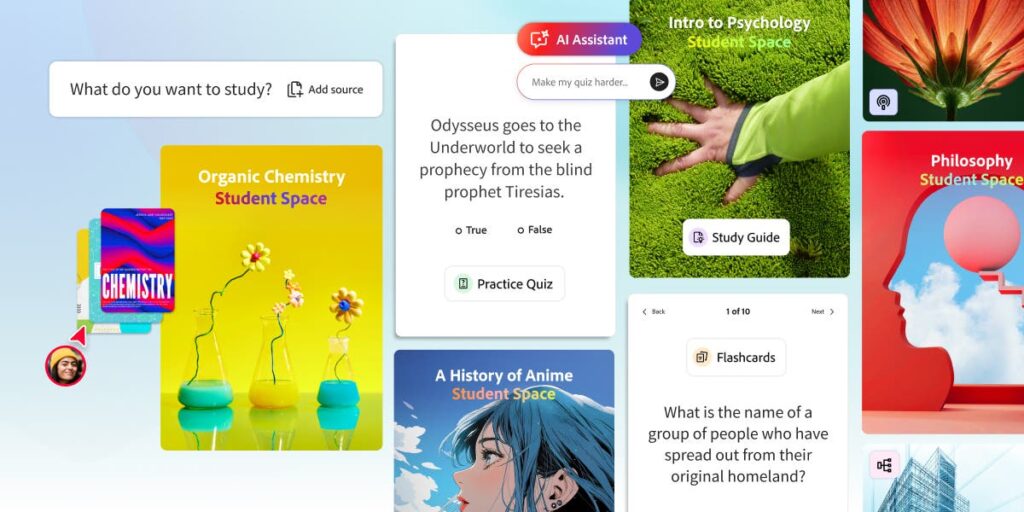
The core promise is simple yet powerful: upload your study materials, and Adobe’s AI will help you understand them better by automatically generating summaries, flashcards, quizzes, learning roadmaps, AI-generated podcasts, and even ready-to-use PowerPoint presentations. This goes far beyond basic note-taking — it transforms passive reading into an active, multi-modal learning experience.
In this comprehensive 2026 guide, we explore everything about Adobe Student Spaces: its key features, how it compares to competitors like GoodNotes, real-world use cases for students, potential limitations, and practical tips for getting the most out of the platform. Whether you’re a student looking to streamline your revision process or an educator interested in AI-enhanced teaching tools, this in-depth review will help you decide if Student Spaces deserves a place in your digital study toolkit.
What Is Adobe Student Spaces and Why Does It Matter in 2026?
The Rise of AI in Education The education landscape in 2026 is defined by personalization, accessibility, and efficiency. AI tools now handle repetitive tasks such as summarizing long texts, creating practice questions, and converting written notes into audio formats. This frees up students to focus on understanding concepts rather than mechanical note-taking or memorization drills.
Adobe Student Spaces enters this competitive space as a completely free offering. Unlike many premium AI study tools that lock advanced features behind paywalls, Adobe is making its AI capabilities available to students without cost — a significant move that could democratize high-quality learning assistance.
Core Concept: AI-Powered Study Workspace Student Spaces functions as a centralized digital workspace. Students upload materials in various formats:
- PDF documents
- Microsoft Word (.docx)
- PowerPoint presentations (.pptx)
- Excel spreadsheets (.xlsx)
- Web URLs (webpages)
- Images and scanned notes
Once uploaded, Adobe’s AI engine processes the content and offers multiple helpful outputs:
- Automatic Summaries — Concise overviews of key points
- Interactive Quizzes — Multiple-choice, true/false, and short-answer questions generated from the material
- Flashcards — Ready-to-review digital cards for spaced repetition
- Learning Roadmaps — Step-by-step study plans tailored to the content
- AI Podcasts — Spoken explanations or discussions of the material (similar to features previously introduced in Adobe Acrobat)
- PowerPoint Generation — Automated slide decks for presentations or revision
This multi-format support and diverse output options set Student Spaces apart from simpler note-taking apps.
Comparison with GoodNotes and Other Tools GoodNotes remains popular for handwriting recognition and digital paper simulation, especially on iPad. However, it lacks deep AI generation capabilities for quizzes, podcasts, or presentations. Student Spaces feels more like a hybrid between GoodNotes’ organization features and the generative power of tools like NotebookLM or Claude Projects.
While Google NotebookLM excels at audio overviews (“Audio Overviews”), Adobe integrates podcast creation directly with document handling and adds presentation tools — giving it a slight edge for students who need to prepare both for exams and class presentations.
Target Audience
- High school and university students
- Lifelong learners preparing for certifications
- Educators looking for quick ways to create study materials
- Anyone who wants to reduce paper usage and study more efficiently
Adobe’s Educational Vision According to Charlie Miller, Vice President of Education at Adobe, Student Spaces was developed to address real student pain points: information overload, difficulty retaining material, and the time-consuming nature of creating study aids. By leveraging Adobe’s AI advancements (building on years of work in Acrobat and Firefly), the company aims to make high-quality learning assistance accessible to everyone.
Key Features of Adobe Student Spaces in Detail
1. Multi-Format Document Upload and Processing Student Spaces supports a wide range of file types, making it versatile for different subjects and assignments. Whether your professor shares a PDF textbook chapter, a Word essay prompt, or a PowerPoint lecture, the platform can handle it.
2. AI Summarization Upload a dense 50-page research paper, and the AI quickly produces a clear, concise summary highlighting main arguments, key data, and conclusions. Summaries can be adjusted in length and focus (e.g., “focus on methodology” or “summarize for exam revision”).
3. Intelligent Quiz Generation This is one of the standout features. The AI analyzes uploaded content and creates customized quizzes:
- Multiple choice
- True/False
- Fill-in-the-blank
- Short answer
Quizzes adapt to difficulty levels and can be taken repeatedly with new variations. Immediate feedback helps reinforce learning.
4. Digital Flashcards Automatically generated flashcards support spaced repetition techniques. Students can mark cards as “easy,” “medium,” or “hard” to optimize review schedules.
5. AI-Powered Learning Roadmaps Based on the material and your goals (e.g., “prepare for midterm exam in 2 weeks”), the AI creates personalized study plans with daily tasks, recommended review times, and progress tracking.
6. AI Podcast Creation Building on Adobe’s earlier Acrobat podcast feature, Student Spaces can generate spoken explanations of the material. Choose a voice style, length, and focus — perfect for auditory learners or commuting students who prefer listening over reading.
7. Automated PowerPoint Generation Need to present what you’ve learned? The AI can create professional-looking slide decks complete with headings, bullet points, suggested images, and speaker notes. This saves hours of manual formatting.
8. Sharing and Collaboration Generate shareable links for notes, quizzes, roadmaps, or podcasts. Teachers can create class-wide materials, while students can collaborate on group projects.
9. Organization and Workspace Features
- Project-based workspaces
- Tagging and search
- Version history
- Export options (PDF, PPT, audio files, etc.)
How Student Spaces Compares to GoodNotes, NotebookLM, and Other Tools
GoodNotes Strengths: Excellent handwriting support, digital paper feel, PDF annotation. Weaknesses: Limited AI generation for quizzes, podcasts, or presentations. Student Spaces wins for automated study aids.
Google NotebookLM Strengths: Strong audio overviews and note synthesis. Weaknesses: Less focus on quiz/flashcard generation and presentation tools. Adobe offers broader output formats.
Other Competitors (Notion AI, Turbo AI, etc.) Many tools provide summarization, but few combine document handling, quiz generation, podcast creation, and slide deck building in one free package.
Unique Adobe Advantages
- Deep integration with document formats (thanks to Acrobat heritage)
- High-quality AI podcast generation
- Professional presentation output
- Completely free core features (no paywall for basic AI tools)
Potential Limitations
- Still relatively new — feature set may expand rapidly
- AI accuracy depends on input quality
- Internet connection required for full AI processing
- Privacy considerations when uploading sensitive academic materials
Real-World Use Cases and Student Tips for 2026
High School Students Use Student Spaces to break down textbook chapters into quizzes and flashcards. Generate quick revision podcasts for morning commutes.
University Students Upload lecture slides and research papers. Create roadmaps for exam preparation and generate presentation decks for group projects.
Language Learners Upload foreign language texts. Generate pronunciation podcasts and vocabulary quizzes.
Practical Tips
- Start with clear, well-structured source materials for best AI results
- Combine outputs: Use summaries + quizzes + podcasts for multi-modal learning
- Regularly review and edit AI-generated content for accuracy
- Export materials for offline use when needed
- Share workspaces with study groups for collaborative learning
Accessibility Benefits
- Audio podcasts help visual or reading-challenged students
- Quizzes and flashcards support different learning styles
- Reduced paper usage aligns with eco-friendly studying
The Future of AI in Student Tools and Adobe’s Role
In 2026, AI study assistants are becoming essential rather than optional. Adobe’s decision to offer Student Spaces for free signals a broader industry trend toward accessible education technology.
Looking ahead, we can expect:
- Deeper integration with other Adobe tools (Acrobat, Express, etc.)
- Improved multimodal AI (text + image + audio understanding)
- Enhanced personalization based on learning progress
- Better offline capabilities
Adobe’s move also puts pressure on competitors to improve free tiers or lower prices.
Adobe Student Spaces represents a significant step forward for student productivity tools in 2026. By combining powerful AI capabilities with familiar document handling strengths, it offers a versatile, free alternative to apps like GoodNotes while adding unique features such as AI podcast generation and automated PowerPoint creation.
Whether you need help mastering complex subjects, preparing for exams, creating study materials, or reducing paper waste, Student Spaces provides practical assistance that can genuinely improve learning outcomes.
Final Verdict: Highly recommended for students of all levels. While not perfect, its free access, broad feature set, and Adobe’s document expertise make it one of the most promising AI learning tools available today.
Start exploring Adobe Student Spaces today and experience how AI can transform the way you study.
Adobe Student Spaces – FAQ
1. What is Adobe Student Spaces?
Adobe Student Spaces is a free AI-powered study platform that helps students upload learning materials and automatically generate summaries, quizzes, flashcards, podcasts, and presentations.
2. Is Adobe Student Spaces free?
Yes, Adobe Student Spaces is designed as a free tool for students, offering core AI study features without a subscription fee.
3. What file types does it support?
It supports multiple formats including:
- PDF documents
- Word files (.docx)
- PowerPoint presentations (.pptx)
- Excel spreadsheets (.xlsx)
- Images and scanned notes
- Web URLs
4. How does Adobe Student Spaces help students?
It helps by turning study materials into:
- Summaries
- Flashcards
- Quizzes
- Learning roadmaps
- AI-generated podcasts
- Presentation slides
5. How is it different from GoodNotes or Notion AI?
Unlike GoodNotes or Notion AI, Adobe Student Spaces focuses heavily on AI-generated learning tools, such as quizzes, podcasts, and presentations, rather than just note-taking.
6. Can Adobe Student Spaces replace traditional studying?
It can greatly improve studying efficiency, but it is best used as a support tool, not a full replacement for active learning and understanding.
7. Who can use Adobe Student Spaces?
It is designed for:
- High school students
- University students
- Teachers and educators
- Self-learners and exam candidates
8. Does it create quizzes automatically?
Yes, it can automatically generate multiple-choice, true/false, fill-in-the-blank, and short-answer quizzes based on uploaded materials.
9. Can it generate presentations?
Yes, it can convert study content into PowerPoint-style presentations with slides, bullet points, and speaker notes.
10. Is it good for exam preparation?
Yes, it is highly effective for exam prep because it creates summaries, quizzes, and revision roadmaps tailored to your study materials.
11. Does it work for group study?
Yes, it allows sharing of notes, quizzes, and study spaces, making it useful for collaborative learning.
12. Are there any limitations?
Yes, including:
- Requires internet access
- AI accuracy depends on input quality
- Still a new platform with evolving features
13. How is it different from other AI study tools?
Adobe Student Spaces combines document processing + AI learning tools + presentation creation in one free platform, making it more complete than many competitors.
14. Can it help with language learning?
Yes, it can generate summaries, quizzes, and audio-based learning content that is helpful for language learners.
15. Is it safe to upload study materials?
Yes, but users should avoid uploading sensitive or private documents, as AI processing typically requires cloud-based analysis.
Leave a Reply