
The Quickest (and Best) Way to Create Forms in 2026: Wufoo – Complete Guide to Building, Styling, Integrating, and Managing Online Forms
2 weeks ago · Updated 2 weeks ago
Creating online forms has always been a necessary but often tedious part of web development. From contact forms and surveys to registration pages and payment gateways, forms are essential for collecting user data, processing orders, and gathering feedback.
In the early days, building a form meant writing HTML markup, handling server-side processing, validating input, and creating reports — a time-consuming process prone to errors and security vulnerabilities.
Wufoo changed the game by offering a powerful, user-friendly platform that simplifies the entire form creation process. In 2026, Wufoo remains one of the most efficient tools for quickly building professional, secure, and visually appealing forms without writing extensive code.
This comprehensive guide walks you through everything you need to know about Wufoo in 2026:
- Creating your first form in minutes
- Customizing design and styling
- Integrating forms into your website
- Using the Wufoo API for advanced data management
- Best practices for accessibility, security, and performance
- Modern integrations with popular tools and platforms
Whether you’re a designer, developer, marketer, or business owner, Wufoo can save you hours of development time while delivering polished, functional forms that enhance user experience.
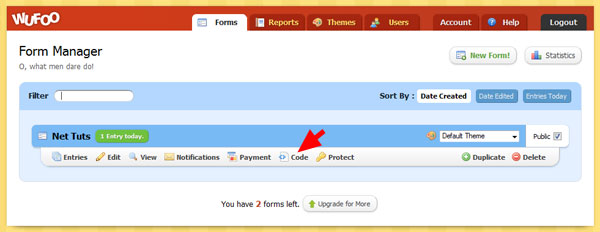
Wufoo stands out because it handles the heavy lifting:
- Drag-and-drop form builder with intuitive interface
- Beautiful, responsive templates
- Built-in spam protection and security features
- Automatic data collection and reporting
- Easy embedding options (JavaScript, iframe, or direct link)
- Powerful API for programmatic access
- Integrations with payment processors, CRMs, email marketing tools, and more
In 2026, Wufoo supports modern requirements like GDPR compliance, accessibility standards (WCAG), mobile optimization, and seamless integration with AI-powered tools for form analysis and automation.
Compared to building forms from scratch or using basic HTML, Wufoo dramatically reduces development time while improving security and user experience.
Getting started with Wufoo is remarkably simple:
- Sign up for a Wufoo account (free tier available for basic use).
- Click “Create a Form” to open the intuitive form builder.
- Drag and drop fields (text, email, dropdown, checkboxes, file upload, etc.) onto the canvas.
- Customize field labels, placeholders, validation rules, and required status.
- Add logic rules for conditional fields if needed.
- Preview the form on desktop and mobile.
- Save and publish.
A simple contact form with name, email, message, and submit button can be created in under 60 seconds.
Wufoo automatically handles:
- Responsive design
- Basic validation
- Spam protection (CAPTCHA or honeypot)
- Secure data storage
Wufoo offers extensive theming options:
- Choose from dozens of pre-built themes
- Create custom themes with your brand colors, fonts, and logos
- Adjust layout, spacing, button styles, and field appearance
- Add custom CSS for advanced control
In 2026, Wufoo supports dark mode, high-contrast themes for accessibility, and seamless integration with your website’s design system.
Wufoo provides multiple embedding options:
- JavaScript embed (recommended for seamless integration)
- Iframe embed
- Direct link sharing
- WordPress, Squarespace, and other platform plugins
The JavaScript embed allows the form to blend naturally with your site’s design while maintaining full functionality.
For developers, the Wufoo API enables programmatic form creation, data retrieval, and automation.
The Wufoo API allows you to:
- Retrieve form entries programmatically
- Submit data from custom front-ends
- Integrate with other applications and workflows
- Build custom reports and dashboards
Authentication uses an API key, and requests are made via standard HTTP methods. The API supports both JSON and XML responses.
Example use cases:
- Automatically sync form submissions to a CRM
- Build custom dashboards for form analytics
- Create multi-step forms with dynamic behavior
- Always use HTTPS
- Enable spam protection
- Follow WCAG accessibility guidelines
- Provide clear labels and error messages
- Test forms on multiple devices and browsers
- Comply with GDPR and privacy regulations
Wufoo remains one of the quickest and most effective ways to create professional online forms in 2026. Its intuitive builder, powerful features, extensive integrations, and strong security make it an excellent choice for businesses, developers, and designers.
Whether you need a simple contact form or a complex multi-step application, Wufoo handles the heavy lifting so you can focus on what matters most — your users and your business goals.
Start building your next form with Wufoo today and experience how simple and powerful online form creation can be.
FAQ (Frequently Asked Questions)
Q1: What is Wufoo?
A: Wufoo is an online form builder that allows users to create, customize, and manage forms without coding.
Q2: Is Wufoo free to use?
A: Yes, Wufoo offers a free plan with limited features, along with paid plans for advanced functionality.
Q3: Who should use Wufoo?
A: Designers, developers, marketers, and business owners who want to create professional forms quickly and efficiently.
Q4: Can I embed Wufoo forms on my website?
A: Yes, Wufoo supports JavaScript embeds, iframes, direct links, and integrations with platforms like WordPress.
Q5: Does Wufoo support payment forms?
A: Yes, Wufoo integrates with payment processors to handle transactions securely.
Q6: Is Wufoo secure?
A: Yes, it includes built-in security features like HTTPS encryption, spam protection, and GDPR compliance.
Q7: Can developers use the Wufoo API?
A: Yes, the API allows developers to retrieve data, automate workflows, and integrate with other systems.
Q8: Is Wufoo mobile-friendly?
A: Yes, all forms are responsive and optimized for mobile devices.
Leave a Reply