
This Hidden Samsung Galaxy S26 Feature Has Changed How I Watch Netflix and YouTube on the Move
2 days ago · Updated 2 days ago
If you own a Samsung Galaxy S26, S26+, or S26 Ultra, there’s a very useful hidden tool that can dramatically improve your video viewing experience — especially when you’re watching on the go. It’s called Audio Eraser, and it uses AI to identify and reduce background noise in any video you’re playing.
Originally introduced last year for editing your own recorded videos, Audio Eraser has now been expanded in One UI 8.5 to work with any video app, including Netflix, YouTube, TikTok, and more. It’s one of those small but powerful features that makes a noticeable difference in real-world use.
I’ve been using it to make movies, TV shows, and video podcasts much easier to follow when I’m commuting or traveling, and it can genuinely transform the experience when background noise is an issue.
How to Enable Audio Eraser on Your Galaxy S26
The feature is easy to access but not immediately obvious:
- Play any video in any app (Netflix, YouTube, TikTok, etc.).
- Swipe down from the top right of the screen to open the Quick Settings panel.
- Look for the Audio Eraser option at the top (it appears only when a video is playing).
- Tap it to open the controls.
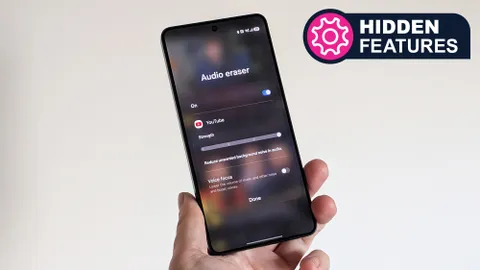
You’ll see two main options:
- A slider to adjust the strength of background noise reduction
- A Voice Focus toggle that lowers music and other noise while boosting dialogue
The Voice Focus option is especially useful for video podcasts, interviews, or dialogue-heavy scenes in movies and TV shows.
Real-World Experience: Subtle but Effective
In my testing, the changes are subtle but meaningful — especially in noisy environments like trains, planes, or busy cafes. Movie and TV directors usually mix audio well, so the improvement isn’t dramatic, but it does make dialogue clearer and reduces distractions.
Where Audio Eraser really shines is with user-generated content or videos recorded in challenging conditions. The feature can clean up wind noise, crowd chatter, or background music, making spoken words much more intelligible.
Using Audio Eraser on Your Own Videos
The original version of Audio Eraser is still available for editing videos you’ve recorded yourself:
- Open the Gallery app
- Select a video you recorded
- Tap the Galaxy AI button (the stars icon)
- Choose Audio Eraser
- Use Auto mode for quick cleanup or manually adjust Music and Noise levels with the slider
- Tap Save edits — the original video is preserved, and a cleaned version is saved separately
This is particularly useful for videos recorded outdoors or in noisy environments.
Why This Feature Matters in 2026
With more people consuming video content on mobile devices than ever before, features that improve audio clarity without requiring headphones are becoming increasingly valuable. Audio Eraser is a perfect example of how on-device AI can solve real everyday problems.
It also shows Samsung’s continued investment in practical AI features that enhance the user experience rather than just adding flashy but rarely used tools.
The Bigger Picture: Samsung’s AI Strategy
Audio Eraser is part of Samsung’s broader Galaxy AI suite, which now includes:
- Live Translate
- Note Assist
- Photo Assist
- Circle to Search
- Privacy Display (on the S26 Ultra)
Together, these features are helping Samsung differentiate its flagships from competitors by focusing on useful, everyday improvements rather than just raw specifications.
Final Thoughts
The Audio Eraser feature on the Galaxy S26 series is one of those small but impactful additions that makes a real difference in daily use. It’s not revolutionary, but it’s genuinely useful — especially when you’re watching videos in less-than-ideal listening conditions.
If you own a Galaxy S26, S26+, or S26 Ultra, I highly recommend trying Audio Eraser the next time you watch something on Netflix or YouTube. You might be surprised how much clearer the dialogue becomes.
Have you tried Audio Eraser on your Galaxy S26 yet? How has it changed your video watching experience? Share your thoughts in the comments!
FAQ (Frequently Asked Questions)
1. What is Audio Eraser on Samsung Galaxy S26?
Audio Eraser is an AI-powered feature on the Samsung Galaxy S26 series that reduces background noise and enhances voices in videos.
2. Does Audio Eraser work on all video apps?
Yes, on One UI 8.5 it works with apps like YouTube, Netflix, and TikTok.
3. How do I enable Audio Eraser?
Play a video, open Quick Settings, and tap the Audio Eraser option that appears at the top.
4. What does Voice Focus do?
Voice Focus boosts dialogue while reducing background sounds like music or ambient noise.
5. Can I use Audio Eraser on my own recorded videos?
Yes, you can edit videos in the Gallery app using the Galaxy AI tools.
6. Is Audio Eraser effective in noisy environments?
Yes, it works best in places like trains, planes, or cafes by making voices clearer.
7. Does Audio Eraser affect video quality?
No, it only processes audio, leaving video quality unchanged.
8. Which devices support Audio Eraser?
Currently, it is available on the Samsung Galaxy S26 Ultra, S26+, and S26 models running One UI 8.5.
Leave a Reply