
What is Encryption? A Complete 2026 Guide to How It Works, Types, Benefits, and Why It Matters
2 weeks ago

In our increasingly digital world, encryption has become one of the most important technologies protecting our personal information, financial data, private communications, and national security. From the messages you send on WhatsApp to the files stored on your laptop or in the cloud, encryption ensures that only authorized parties can access sensitive information.
Encryption is the process of converting readable data (called plaintext) into an unreadable format (called ciphertext) using mathematical algorithms and keys. Only someone who possesses the correct decryption key can convert the ciphertext back into plaintext. This technology acts as a powerful digital lock that keeps hackers, governments, and unauthorized third parties from reading your private data.
In 2026, encryption is more critical than ever. With the explosion of AI, cloud computing, IoT devices, and sophisticated cyberattacks, strong encryption is the last line of defense for individuals and organizations alike. From end-to-end encrypted messaging apps to full-disk encryption on smartphones and laptops, modern operating systems like iOS, Android, and Windows now integrate high-level encryption by default.
This comprehensive guide explains what encryption is, how it works, the different types of encryption, its major benefits, and why it remains essential in our connected world.
Encryption is a security method that scrambles data so that it becomes unreadable to anyone who does not have the correct key. Think of it as putting your message inside a locked box — only the person with the right key can open it and read the contents.
Without encryption, your emails, messages, banking details, medical records, and photos would be easily accessible to hackers, internet service providers, or even governments. Encryption protects privacy, prevents identity theft, secures online transactions, and safeguards national security.
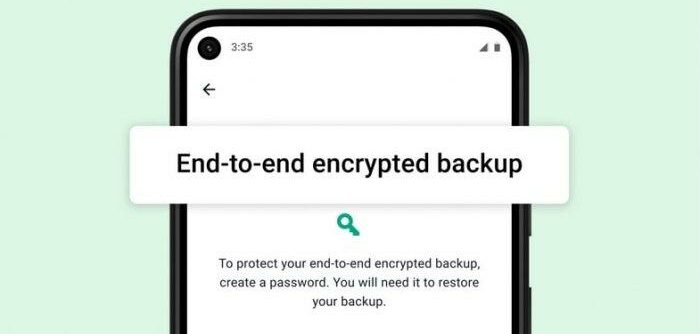
Modern encryption is used in:
- Messaging apps (WhatsApp, Signal, iMessage)
- Banking and payment systems
- Cloud storage (Google Drive, iCloud, Dropbox)
- VPNs and secure browsing
- Full-disk encryption on laptops and smartphones
The core idea is simple: turn readable data into scrambled data during transmission or storage, and only allow authorized users to unscramble it.
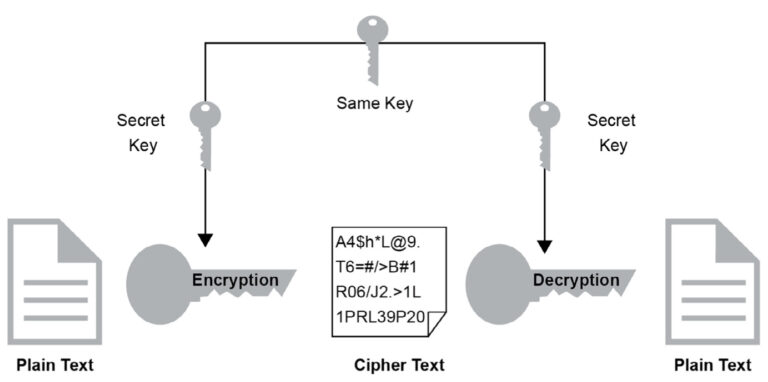
Encryption involves two main processes: encryption (scrambling the data) and decryption (unscrambling it). This is done using mathematical algorithms called ciphers and secret keys.
There are two primary types of encryption based on key usage:
- Symmetric Encryption (Secret Key Encryption) Uses a single shared key for both encryption and decryption. It is fast and efficient, making it ideal for encrypting large amounts of data. The most widely used symmetric algorithm is AES (Advanced Encryption Standard) — employed by governments, banks, and popular apps. Example: When you send an encrypted message on WhatsApp, both you and the recipient share the same secret key (handled automatically by the app).
- Asymmetric Encryption (Public Key Encryption) Uses two mathematically related keys: a public key (which anyone can see) and a private key (kept secret by the owner). Data encrypted with the public key can only be decrypted with the corresponding private key. The most famous asymmetric algorithm is RSA. It is commonly used for secure website connections (HTTPS) and email encryption.
Many modern systems combine both: asymmetric encryption is used to securely exchange a symmetric key, which then handles the actual data encryption (this is called a hybrid system).
Here are the most important types of encryption used today:
- End-to-End Encryption (E2EE) Only the sender and recipient can read the message. Popular in WhatsApp, Signal, and iMessage. Even the service provider cannot access the content.
- Full-Disk Encryption (FDE) Encrypts the entire storage drive of a device. Used in BitLocker (Windows), FileVault (macOS), and default encryption on modern Android and iOS devices.
- HTTPS / TLS Encryption Secures communication between your browser and websites. The padlock icon in your browser indicates TLS encryption is active.
- Homomorphic Encryption Allows computation on encrypted data without decrypting it first — useful for privacy-preserving cloud computing and AI.
- Field-Level / Column-Level Encryption Encrypts specific fields in a database (e.g., credit card numbers, ID numbers).
- Cloud Storage Encryption Encrypts files before they are uploaded to services like Google Drive or iCloud.
- Deniable Encryption Allows plausible deniability — the encrypted data can be decrypted in multiple ways depending on the key provided.
Each type serves different purposes, from securing instant messages to protecting entire databases.
Encryption provides numerous critical benefits:
- Protection of Personal Data Prevents unauthorized access to your messages, photos, documents, and financial information.
- Secure Online Transactions Makes online banking, shopping, and payments safe from interception.
- Privacy in Communication Ensures only intended recipients can read your messages (especially important in authoritarian regimes or for journalists).
- Compliance with Regulations Many laws (GDPR, HIPAA, etc.) require encryption for sensitive data.
- Digital Signatures and Authentication Verifies the identity of the sender and ensures documents have not been tampered with.
- Protection Against Data Breaches Even if hackers steal encrypted data, they cannot read it without the decryption key.
Section 5: Common Encryption Algorithms and Standards (≈ 550 words)
- AES-256: The gold standard for symmetric encryption. Extremely secure and used worldwide.
- RSA: The most common asymmetric algorithm for key exchange.
- ChaCha20: A modern, fast alternative to AES, often used in mobile devices.
- ECC (Elliptic Curve Cryptography): More efficient than RSA for mobile and embedded devices.
While encryption is powerful, it faces challenges such as:
- Government demands for backdoors
- Quantum computing threats (post-quantum cryptography is being developed)
- Key management complexity
- Balancing security with usability
In 2026, we are seeing stronger default encryption in operating systems, widespread adoption of E2EE in messaging apps, and increasing use of zero-knowledge encryption in cloud services.
Encryption is the foundation of digital privacy and security in the modern world. From protecting your WhatsApp chats to securing national infrastructure, it ensures that sensitive information remains confidential and tamper-proof.
Understanding how encryption works, its different types, and its benefits empowers you to make better decisions about the tools and services you use every day. In 2026, enabling encryption wherever possible is no longer optional — it is essential for protecting your digital life.
Stay safe, stay private, and always prioritize strong encryption.
FAQ (Frequently Asked Questions)
- What is encryption?
- Encryption is the process of converting readable data (plaintext) into an unreadable format (ciphertext) using mathematical algorithms and keys to protect sensitive information.
- Why is encryption important in 2026?
- With AI, cloud computing, IoT, and sophisticated cyberattacks, encryption protects personal data, financial information, private communication, and national security.
- What are the main types of encryption?
- Symmetric (secret key) encryption and Asymmetric (public/private key) encryption. Many systems use a hybrid of both.
- What are common encryption methods used today?
- End-to-End Encryption (WhatsApp, Signal), Full-Disk Encryption (BitLocker, FileVault), HTTPS/TLS, Homomorphic Encryption, Cloud Storage Encryption, and Field-Level Encryption.
- Which encryption algorithms are widely used?
- AES-256, RSA, ChaCha20, and ECC (Elliptic Curve Cryptography).
- How does encryption protect my privacy?
- It ensures that only authorized users with the correct key can access data, preventing hackers, service providers, and unauthorized third parties from reading your information.
- What challenges does encryption face?
- Key management, government backdoor requests, quantum computing threats, and balancing usability with security.
- Should I enable encryption on my devices?
- Yes. Modern operating systems and apps already integrate strong encryption, and enabling it ensures your data remains private and secure.
Leave a Reply